Generative UI Needs a Component Catalog You Own
MCP Apps, A2UI, and json-render let agents return UI, not just text. Let the model pick from components you own and validate its output like a tool call.
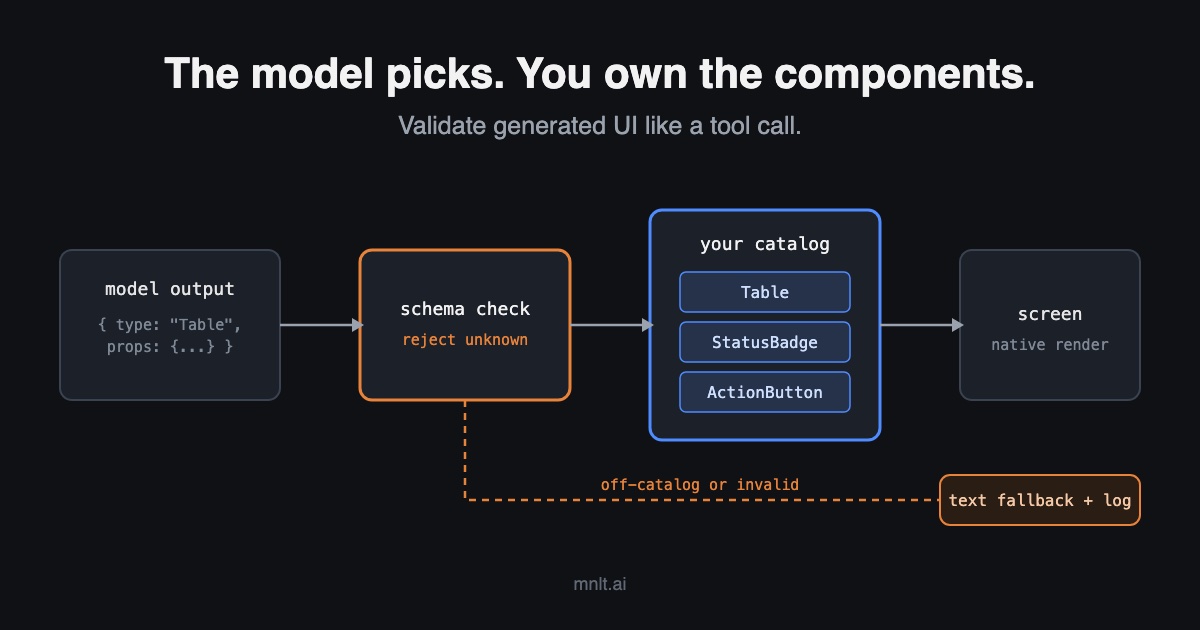
Agent products are starting to answer with interfaces instead of paragraphs. In January 2026, MCP shipped MCP Apps, its first official extension, so a tool can return an interactive UI inside the chat. Google’s A2UI lists v0.9.1 as its production release, with v1.0 as a candidate. Vercel Labs publishes json-render, and the AI SDK maps tool calls to React components.
Our read: the framework choice matters less than one design decision. How much of the UI does the model get to write? For most teams, the answer should be “none of the code, some of the composition.” Let the model pick from a catalog of components you own. Treat what it returns like any other model output: parse it, validate it, and fall back when it’s wrong.
Key Takeaways
- Generative UI comes in three levels: the model fills a fixed component, assembles components from a catalog, or writes raw HTML.
- The catalog level is the right production default. Your team owns the code; the model only chooses structure and data.
- Model-generated UI is untrusted output. Validate it against a schema before render, exactly as you validate tool arguments.
- MCP Apps answers a different question. The HTML comes from the server developer, so the risk is third-party code in your host, not model-written code.
- Measure it: schema rejection rate, fallback rate, and whether the chosen component was the right one.
What are the three levels of generative UI?
The useful split is who writes the interface code. CopilotKit’s Eli Berman described three kinds of generative UI in September 2025. The awesome-generative-ui list draws a similar line between constrained and unconstrained generation.
| Static | Declarative (catalog) | Open-ended | |
|---|---|---|---|
| Who writes the UI code | Your team | Your team | The model |
| What the model outputs | Arguments for one known component | A tree of catalog components, props, and data | HTML, CSS, JavaScript |
| Typical tools | AI SDK tool-to-component mapping | A2UI, json-render | Raw generation in a sandbox |
| How you check it | Tool argument schema | Catalog schema plus renderer | Sandbox; little to validate |
| Main failure | Too rigid for new cases | Catalog drift, wrong component | Broken layout, inaccessible UI, injection |
Static is where most teams already are, even if they don’t call it generative UI. In the AI SDK docs’ example, a displayWeather tool returns data, and a Weather component renders it. The AI SDK docs model this with typed message parts and three states: input available, output available, and error. That’s a solid base. It just doesn’t scale past the components you thought of in advance.
Declarative is the middle. A2UI and json-render both let the model compose a screen from components the client has approved. The output is a flat JSON tree that streams in and renders with native widgets. Berman calls this level the “sweet spot.” CopilotKit co-develops A2UI, so read that as an interested view. We reach the same conclusion for the validation reasons below.
Open-ended generation works, but it’s the hardest to control. Berman recommends it for build-time code generation and prototyping, not live runtime use. We’d hold that line too.
Why should the model pick components instead of writing them?
Because generated UI is model output, and you already know how to handle model output. You don’t execute a tool call because the model said so. You check the arguments against a schema first. A UI description deserves the same treatment, since a user will read it, click it, and trust it.
A catalog gives you four things raw generation can’t.
- A schema you can reject against. If the model invents a component or a prop, validation fails before anything renders. json-render’s docs describe this guardrail directly: the model is limited to catalog types and outputs data, not code.
- Your design system and accessibility, inherited. Every component in the catalog is one your team already built, reviewed, and tested. The model can’t produce a button without a label, because the
Buttoncomponent requires one. - Actions you control. A catalog action is a named intent such as
approve_refund, not an arbitrary URL or script. Your code decides what the intent does and whether it needs confirmation. - Tests that mean something. You can render every catalog component in CI. You can’t meaningfully test HTML that doesn’t exist until runtime.
There’s also a security reason that’s easy to miss. An agent reading web pages, emails, or tickets can be steered by text it reads. If that agent can write arbitrary UI, injected text can produce a convincing form in your product’s own styling. A catalog doesn’t remove prompt injection. It does shrink what injected instructions can make appear on screen. A2UI’s site makes a similar claim for its data-not-code format; treat that as the designers’ intent, not an audit result.
We made the same argument about keeping agent credentials outside the sandbox. Put the boundary where the model can’t talk its way across it.
What does a catalog look like in practice?
Design it like a public API, because to the model, it is one. Keep it small, type every prop, and version it. Here’s the shape we’d start with. It’s illustrative, not any one framework’s exact format.
// catalog.ts: the only components the model may use
import { z } from "zod";

export const catalog = {
  Table: z.object({
    columns: z.array(z.string()).max(8),
    rows: z.array(z.array(z.string())).max(50),
  }),
  StatusBadge: z.object({
    label: z.string().max(40),
    tone: z.enum(["ok", "warn", "error"]),
  }),
  ActionButton: z.object({
    label: z.string().max(30),
    action: z.enum(["approve_refund", "escalate", "open_ticket"]),
    params: z.record(z.string(), z.string().max(64)),
  }),
} as const;

// render.ts: validate, then render, else fall back to text
// log: your structured logger
export function renderNode(node: { type: string; props: unknown }) {
  if (!Object.hasOwn(catalog, node.type)) {
    log.warn("ui_rejected", { type: node.type });
    return { kind: "text_fallback" };
  }
  const schema = catalog[node.type as keyof typeof catalog];
  const parsed = schema.safeParse(node.props);
  if (!parsed.success) {
    log.warn("ui_rejected", { type: node.type });
    return { kind: "text_fallback" };
  }
  return { kind: "component", type: node.type, props: parsed.data };
}
A few rules make this hold up in production.
- Start with five to ten components. Pull them from your traces. Look at what users actually ask for, not what a demo would show off.
- Make actions an enum.
ActionButtoncan trigger three intents, and your backend decides what each does. Validateparamsagain per intent on the server. Destructive intents get a confirmation step in your code, not in the prompt. - Cap sizes in the schema. A 50-row table limit protects the layout and your token budget. Mobile Reality’s framework guide, written by a vendor with its own format, notes that A2UI trees can be token-heavy for models to generate.
- Always have a text fallback. When validation fails, show the answer as text and log the rejection. A plain answer is better than a broken screen.
- Version the catalog. When you change a prop, old conversations and cached prompts still reference the old shape. Treat it like an API migration.
Where does MCP Apps fit?
MCP Apps answers a different question, and mixing the two up leads to the wrong controls. MCP Apps builds on MCP-UI and the OpenAI Apps SDK. In it, the model doesn’t write the interface. A tool declares a ui:// resource, and the server developer ships the HTML and JavaScript behind it. The host renders that bundle in a sandboxed iframe and talks to it over JSON-RPC.
From the model’s side, that’s close to the static level: it decides to call a tool, and a fixed UI appears. From the host’s side, it’s open-ended: you’re running someone else’s code in your product. So the question isn’t “is the model’s output valid?” It’s “do I trust this server’s bundle?”
The 2026-01-26 spec gives you real tools for that.
- Content Security Policy. A server declares
connectDomains,resourceDomains, and related lists inui.csp. If it declares nothing, the host must allow no external origins, and it must never allow undeclared domains. - Tool visibility.
_meta.ui.visibilityseparates tools the model can call from tools only the app can call. An app-only tool never appears in the agent’s tool list. A model-only tool can’t be called from the iframe. - Model context updates. The app can push context to the model with
ui/update-model-context. Each call overwrites the last. The host may defer or deduplicate updates, and only the latest before the next user message should reach the model.
One gap matters if you build a host. The spec says hosts may ask the user before forwarding a UI-initiated tool call. It doesn’t require it. If your host connects to servers you didn’t write, decide your consent rules yourself. Require approval for any tool with side effects.
If you’re building an MCP server instead, the same catalog thinking applies inside your bundle. And use visibility on purpose. A button that refreshes a chart can be app-only, so the model never sees it as an option.
How do you know generative UI is working?
Instrument it like any other agent behavior. Three numbers tell you most of what you need.
| Metric | What it tells you | Where it comes from |
|---|---|---|
| Schema rejection rate | How often the model produces UI your catalog refuses | Validator logs |
| Fallback rate | How often users got text instead of the intended UI | Renderer logs |
| Component choice accuracy | Whether the model picked the right component for the request | Labeled trace sample, or a grader |
A rising rejection rate after a model upgrade means the model and the catalog disagree. That’s a regression, even if every answer is still correct as text. Component choice accuracy needs evals. Our guide to designing evals for AI agents covers how to build the labeled set. Replaying production traces is the cheapest way to get the cases.
When shouldn’t you use generative UI?
When the screen is the same every time, build the screen. If most requests in your traces want the same order-status view, that’s a page, not a generation problem. The model can still route to it. It shouldn’t compose it on every call.
Skip it, too, when users need predictability more than flexibility. Finance approvals, admin consoles, and anything audited benefit from screens that look the same tomorrow. Generative UI earns its place where requests vary widely and a wall of text is the current answer.
This is the same trade-off we wrote about in complexity being easy and reliability taking design. A model that can draw anything is impressive in a demo. A catalog of ten components that always render is what ships.
The bottom line
Generative UI now has published standards: MCP Apps for third-party UI and A2UI and json-render for declarative composition. The decision that matters is how much freedom the model gets. Own the components, let the model choose and fill them, validate every node before it renders, and fall back to text when validation fails. For MCP Apps, shift the question to trusting the server’s bundle, and set your own consent rules.
One thing to do this week: export 200 recent agent responses from your traces. Tag each one as “text is fine,” “fixed component,” or “needs composition.” If more than about one in ten need composition, write the first five catalog schemas and a validator. Log the rejection rate before you render anything new.
If your agent’s interface already grew without a catalog and keeps breaking, our AI cleanup work starts with exactly this kind of boundary.
Sources
- MCP Core Maintainers, MCP Apps: Bringing UI Capabilities To MCP Clients, Model Context Protocol Blog, January 26, 2026.
- Model Context Protocol, MCP Apps specification, 2026-01-26, GitHub, retrieved October 21, 2026.
- Google, A2UI, retrieved October 21, 2026.
- Vercel Labs, json-render documentation and repository, retrieved October 21, 2026.
- Vercel, Generative User Interfaces, AI SDK UI, retrieved October 21, 2026.
- Eli Berman, The three kinds of generative UI, CopilotKit, September 12, 2025.
- Marcin Sadowski, Top Generative UI Frameworks 2026: A Developer’s Guide, Mobile Reality, July 1, 2026 (updated October 7, 2026). The author’s company promotes its own format.
- narrowin, awesome-generative-ui, GitHub, retrieved October 21, 2026.
- generative-ui
- ai-agents
- mcp
- llm-systems-in-production
- agent-reliability